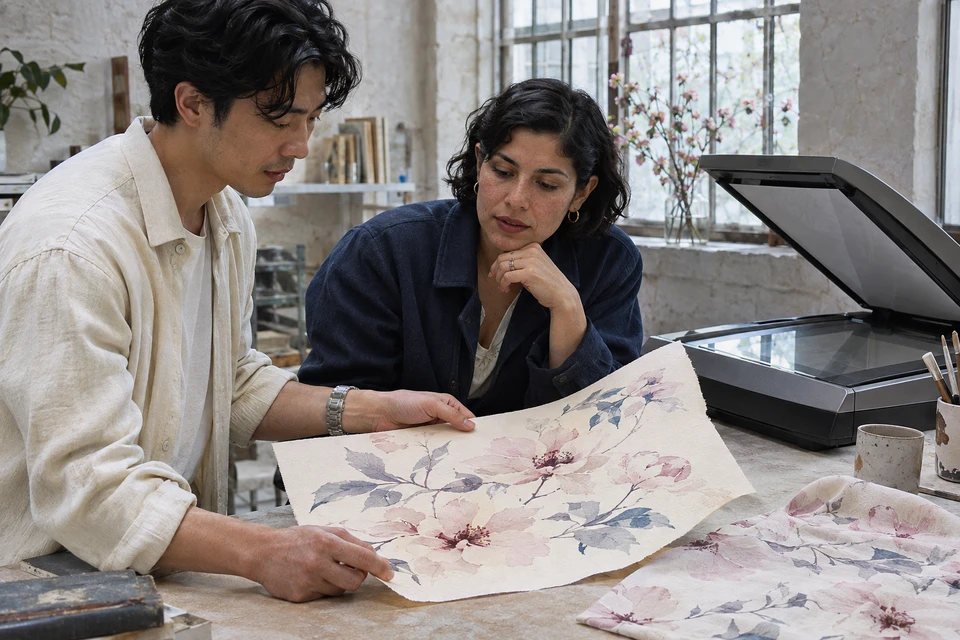
The warm paper behind a painted flower can be part of its charm or an unwanted background in the finished textile. A scan records both unless the artwork is prepared otherwise. Asking someone to make the background white may remove paper colour, but it can also erase the palest petals or change soft edges. Before editing starts, the buyer should decide which parts of the original belong to the printed design and which should become the actual fabric ground.
Identify what the scan contains
Paper colour and fabric colour are different layers of the decision
Review the physical artwork where available and an unchanged scan. Look at blank paper around the motif, textured areas within it and pale washes that approach the paper colour. Ask whether the desired textile effect includes that warm ground, the paper grain, both or neither. A background that appears naturally off-white in a scan may otherwise become a printed field on an off-white fabric, creating a result the buyer never explicitly selected.
Use an authorised master through the agreed artwork route. A floral collection page can communicate a botanical direction but does not establish access to a clean original scan. A photograph of a painted sheet includes lighting and perspective as well as paper texture; it should not be quietly treated as the same source. Record what material the prepress operator actually receives so the development quotation covers the required interpretation rather than assuming a production-ready file exists.
Make a keep-and-remove reference before adjusting
Pale details need positive protection
Mark a small set of examples on a duplicate viewing copy: clean background to remove, paper texture to retain if desired, pale petals to preserve and intentional pigment edges. Choose examples from several parts of the painting. The darkest flower centre is rarely the difficult area. A nearly transparent leaf or the outside of a washed petal is more likely to be lost when the background is pushed towards white.
Explain the intended final ground as a separate design choice. If the buyer wants the actual cloth to provide the pale background, identify that requirement. If a coloured printed field is intentional, define it as part of the artwork. Do not ask the operator to infer this from an attractive mood-board photograph. The approval should distinguish unprinted fabric from an intentionally printed pale area even when they appear similar in a screen preview.
Keep tonal corrections reversible
A clean background is not worth erased painting
Adobe's Levels guidance explains that moving the white input point maps lighter pixels to white and that clipped highlights lose detail. That behaviour is relevant to a pale floral scan, but it does not supply a universal setting for textile artwork. Ask the operator to use an appropriately controlled, reversible workflow and retain the source. Do not prescribe one slider value for every scan or assume an automatic adjustment understands which pale regions are petals.
Compare the revised file with the unchanged version at the same motif scale. Examine the marked pale areas and the transition into the ground, not only the new white border. Watch for abrupt cut-out edges, isolated light flecks or a disappearing wash that changes the flower's shape. If the intended cleanup cannot preserve the drawing, discuss a deliberate retouch or redraw with the authorised artwork owner instead of hiding the loss inside a file labelled corrected.
Evaluate repeat joins after background cleanup
A small residual tone can become a large field effect
A single flower crop may look clean while a repeated tile reveals a rectangular background boundary. Review the complete intended repeat with neighbouring tiles visible. Look for differences at the join and around areas that were cleaned separately. Keep this check focused on residual paper and edge treatment; do not confuse it with a new decision about floral spacing or motif scale. If the layout also changes, identify that as a separate revision.
Ask whether the cleanup is applied consistently across all colourways. Changing petal colours while retaining a faint paper tone can alter the perceived ground differently in each version. Approve representative physical output for the actual proposals rather than assuming a successful ivory-and-pink preview guarantees the same result in a blue or dark-ground variant. The source treatment, output file and colourway should remain linked in the approval record.
Use the actual cloth to settle the ground decision
Digital white is not a material sample
Request a bounded strike-off that contains blank ground, a pale petal, a soft edge and part of the repeat join. Use the proposed fabric and printing route once those are confirmed. A paper print can help locate missing artwork detail, but it cannot demonstrate the interaction between an unprinted textile ground and a printed pale area. Label the purpose of each proof so a quick digital review is not mistaken for finished-fabric approval. The FR-01 floral reference can communicate a botanical direction; its photograph does not confirm the proposed production process or materials.
Compare the proof with the agreed keep-and-remove reference. Record whether the pale details remain readable, whether the intended paper character survives where requested and whether an unwanted rectangular tone remains. Avoid judging the result solely by how white the surrounding cloth looks. A clean but visibly simplified flower may be the wrong design. Keep any intentional interpretation explicit and seek approval from the person authorised to accept artwork changes.
For a floral enquiry to FY Bedding, provide the visual reference, source-file information, desired ground treatment and intended product scale. Ask for a scoped artwork assessment and sample proposal before extending the design across a complete bedding set. Release the selected source revision, production file and physical proof together. This gives the next printer a clear answer about whether the paper is part of the design, while preserving the pale painting that made the collection appealing in the first place.
Does the approved textile distinguish intentional printed background from the actual fabric ground while retaining every pale petal and soft edge selected for protection?
Method references: Adobe Photoshop: levels, clipping and tonal adjustments.